The *arr stack is often introduced as a list of containers.
Run Sonarr. Run Radarr. Add Prowlarr. Add a download client. Point everything at Jellyfin. Open a handful of browser tabs and connect API keys until the dashboards turn green.
That can produce a working demo. It can also produce duplicate files, slow imports, broken permissions, inaccessible paths, exposed management interfaces, and a system nobody can explain six months later.
The useful question is not which containers should I run? It is what contracts have to stay true between them?
This is the architecture and reference companion, not the follow-along installation guide. If you want exact Docker installation commands, directory creation, a complete Compose file, VPN-provider preflight, service startup order, and application-by-application configuration, use Build Your *arr Stack: A Step-by-Step Docker Media Automation Guide.
This article explains why that walkthrough is built the way it is, what may safely change, and which relationships should not drift.
It follows The Definitive Guide to Jellyfin on Ubuntu with Docker. Jellyfin remains the library and playback layer. The automation stack handles requests, policy, search integrations, downloads, imports, naming, and subtitle automation before organized files arrive in Jellyfin’s read-only library view.
Use these tools only with content and services you are authorized to access. Automation does not change copyright, subscription, tracker, indexer, or network-provider rules. The examples describe system design and lawful administration; they do not provide sources or instructions for infringing material.
The reference contract for this media series
The Jellyfin guide and the step-by-step *arr guide now share one reference model.
| Contract | Reference choice | Why it exists |
|---|---|---|
| Host data root | /srv/data | One filesystem tree for downloads and finished media |
| Automation container data root | /data | One consistent path inside download/import containers |
| Finished media on host | /srv/data/media | Shared library boundary |
| Jellyfin media view | /media:ro | Playback does not need download or import authority |
| Automation appdata | /srv/appdata/arr-stack | Small operational state stays separate from bulk media |
| Compose project | /srv/compose/arr-stack | One predictable deployment definition |
| LinuxServer identity | Existing host media UID/GID | Sonarr, Radarr, Lidarr, Prowlarr, Bazarr, SABnzbd, and Deluge can share a deliberate ownership model |
| Seerr config identity | UID/GID 1000:1000 | The official Seerr container runs as its node user |
| Automation network | media-control | Private service-name communication |
| Jellyfin-to-Seerr path | Trusted Jellyfin LAN URL by default | Jellyfin remains a separate Compose project |
| Management exposure | Trusted LAN/management address only | Administrative interfaces should not listen everywhere by accident |
These are reference choices, not universal laws. You can use different host paths, a different identity model, or separate Compose projects. The rule is that a deviation must be explicit and carried through every dependent service.
The most expensive failures happen when one guide assumes /srv/data, another assumes /mnt/media, one container uses UID 1000, another silently uses a system UID, and the operator is left to discover the contract from permission errors.
What “the *arr stack” means
There is no mandatory bundle. Each service has a narrow job.
| Service | Role | Required? |
|---|---|---|
| Sonarr | Series monitoring, release decisions, import, and naming | If managing shows |
| Radarr | Movie monitoring, release decisions, import, and naming | If managing movies |
| Lidarr | Music monitoring, release decisions, import, and naming | If managing music |
| Prowlarr | Central search-integration configuration and application synchronization | Recommended |
| Bazarr | Subtitle management for Sonarr and Radarr libraries | Optional |
| Seerr | User requests and approvals for Jellyfin, Radarr, and Sonarr | Optional |
| SABnzbd | Usenet download client | If using Usenet |
| Deluge | BitTorrent download client | If using BitTorrent |
| Gluetun | VPN network namespace and firewall for Deluge when required | Optional |
| Jellyfin | Library scanning, users, and playback | Separate companion service |
A smaller stack has fewer credentials, fewer databases, fewer update paths, and fewer ambiguous failures.
Jellyseerr and Overseerr became Seerr
The maintained request-management project is now Seerr. New deployments should use Seerr’s current official documentation and container image. Existing Jellyseerr or Overseerr deployments should follow the supported migration path and back up their complete configuration before changing images or application state.
One detail matters to the architecture: the official Seerr container runs as the node user with UID 1000 and expects writable configuration at /app/config. That makes Seerr an intentional exception to the shared LinuxServer PUID/PGID model used elsewhere in this reference stack.
The workflow before the software
The stack is easier to reason about when the control flow is visible.
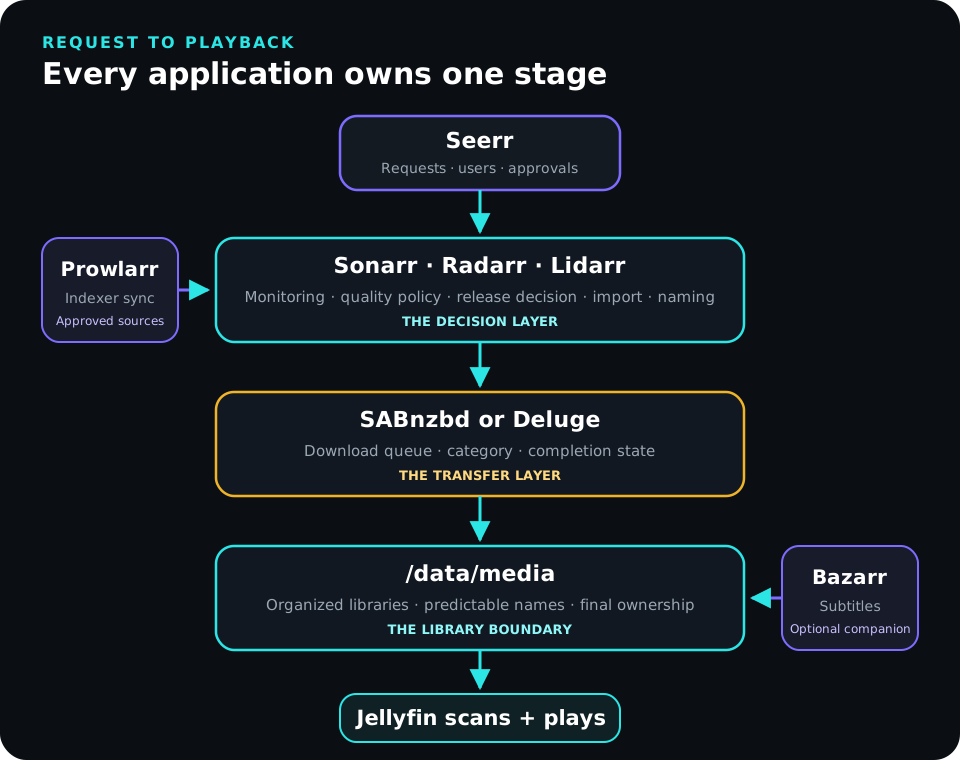
A movie request can move through these stages:
- A user requests a title in Seerr, or an administrator adds it directly in Radarr.
- Radarr decides what is monitored and which quality profile applies.
- Prowlarr supplies the approved search integrations.
- Radarr sends a selected job to SABnzbd or Deluge with the
moviescategory or label. - The downloader writes under
/data/downloads/.... - Radarr observes completion through the downloader API.
- Radarr validates, renames, and imports the file into
/data/media/movies. - Bazarr may add subtitles beside the organized media.
- Jellyfin scans the same host library through its separate
/media/moviesread-only view. - A user plays the result.
Each stage has a different authority. Seerr should not need filesystem write access. Jellyfin should not need the download tree. Prowlarr should not need media files. A downloader should not receive Jellyfin administration credentials.
That separation makes failures easier to locate and compromises easier to contain.
Storage is the primary contract
The most important design choice is giving every downloader and importer one consistent view of the same filesystem tree.
The host reference tree is:
/srv/data
├── downloads
│   ├── torrents
│   │   ├── incomplete
│   │   └── complete
│   │       ├── movies
│   │       ├── shows
│   │       └── music
│   └── usenet
│       ├── incomplete
│       └── complete
│           ├── movies
│           ├── shows
│           └── music
└── media
    ├── movies
    ├── shows
    └── music
Inside Sonarr, Radarr, Lidarr, SABnzbd, and Deluge, that host root becomes:
/data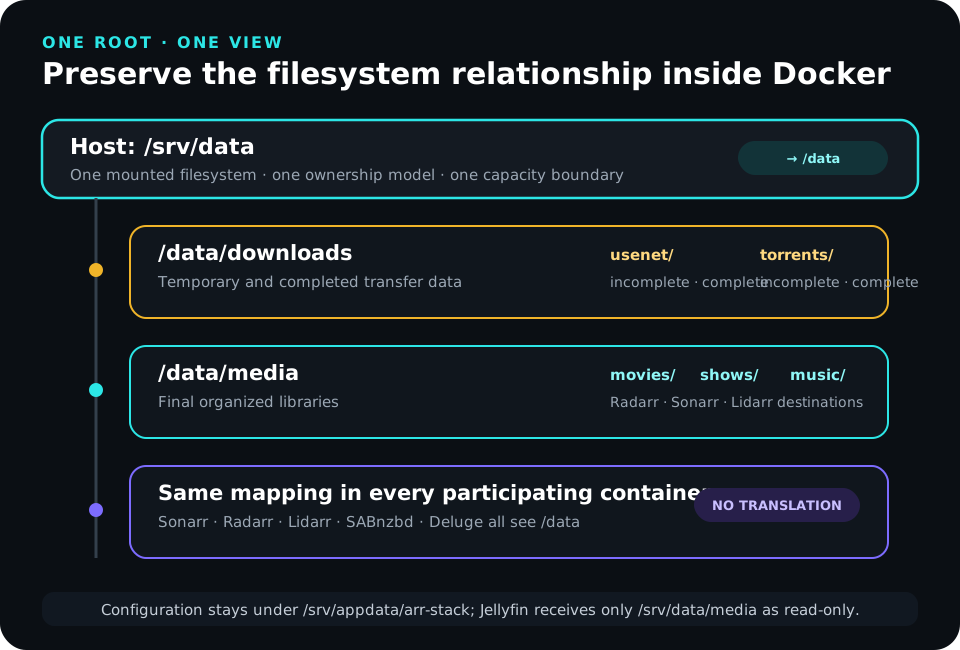
The important mapping is not the specific spelling of /srv/data. The important property is that the applications participating in downloads and imports see one parent mount.
Why separate Docker mounts are a problem
A tempting Compose layout is:
volumes:
  - /srv/data/downloads:/downloads
  - /srv/data/media/movies:/movies
The host paths may live on the same disk, but the container sees separate mount boundaries and unrelated path names.
A single parent mapping preserves the relationship:
volumes:
  - /srv/data:/data
Now the downloader can report /data/downloads/... and Radarr or Sonarr can see the exact same path without a translation layer.
Jellyfin is intentionally different
Jellyfin does not participate in downloads or imports. It needs only the finished library.
The reference Jellyfin deployment receives:
volumes:
  - /srv/data/media:/media:ro
Its libraries become:
/media/movies
/media/shows
/media/music
That difference is safe because no automation application asks Jellyfin to manipulate a download path. Jellyfin receives less authority while the automation applications retain the unified /data view they need for imports.
Hardlinks and atomic moves
The shared root is not only about prettier paths. It preserves useful filesystem behavior.
Atomic moves
When a completed file and its destination are on the same filesystem, an import can often be a metadata operation instead of a full copy followed by a delete.
That reduces import time and unnecessary I/O.
Hardlinks
A hardlink allows an organized library filename and a completed torrent filename to refer to the same underlying file data.
For example:
/data/downloads/torrents/complete/movies/example.mkv
/data/media/movies/Example Movie (2026)/Example Movie (2026).mkv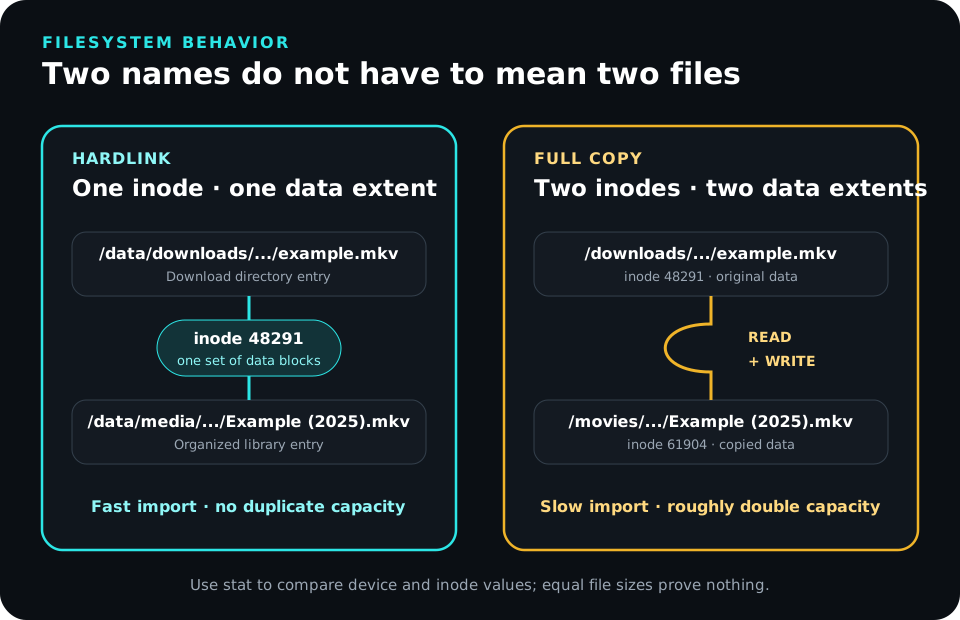
Hardlinks require:
- source and destination on the same filesystem;
- a mount layout that preserves that relationship;
- a filesystem that supports hardlinks;
- an identity with permission to create the second directory entry.
They should be proven, not assumed.
The step-by-step guide performs a disposable preflight hardlink test before the stack is deployed. After a real torrent import, use stat on the completed file and the organized library file. Matching device and inode values prove that both names refer to the same underlying data.
Remote storage changes the failure model
NFS can support this design, but the export, mount, numeric identities, permissions, locking behavior, and startup order become dependencies. SMB can add another identity and filesystem-semantics layer.
The critical question is not “is NFS supported?” It is “does this mounted path, with this service identity, perform the operations this workflow requires?”
If /srv/data is supposed to be a separate or remote mount, test the exact mount point with mountpoint. Do not rely on findmnt --target /srv/data as proof that /srv/data itself is mounted; target lookup can resolve to a parent filesystem.
An absent mount is particularly dangerous because the plain mount-point directory can still exist on the root filesystem. Containers may then write valid-looking data into the wrong disk.
Identity is the second contract
Paths can be perfect and the stack can still fail because the processes disagree about ownership.
The reference media series uses an existing host service account named media. The Jellyfin guide creates it; the step-by-step *arr guide reuses its numeric UID and GID.
LinuxServer images support PUID and PGID, so Sonarr, Radarr, Lidarr, Prowlarr, Bazarr, SABnzbd, and Deluge can use that host identity consistently.
The values are discovered from the host:
id mediaThe important part is the numeric IDs, especially when NFS or another remote filesystem is involved.
Why the admin login is not the service identity
The person administering the host and the processes writing media are different roles.
| Identity | Responsibility |
|---|---|
| Deployment administrator | Edits Compose, manages Docker, reads logs, performs backups |
media service identity | Owns or receives permission to automation appdata and writable media/download paths |
Seerr node user | Owns Seerr’s /app/config data at UID 1000 |
| Jellyfin container identity | Reads the finished library and writes only its own configuration/cache |
Using the login user’s UID merely because it happens to be 1000 works until the host changes, NFS maps differently, or Seerr’s fixed UID collides with assumptions elsewhere.
Seerr is an explicit exception
The official Seerr container runs as UID 1000 and expects its config directory to be writable by that user. It does not participate in media-file imports, so there is no benefit in forcing it into the media UID/GID model.
The clean design is:
- prepare
/srv/appdata/arr-stack/seerrfor1000:1000; - do not pass LinuxServer-style
PUID/PGIDvariables to Seerr; - keep Seerr away from
/srv/dataunless a documented feature actually requires filesystem access.
Exceptions are safe when they are named. Hidden exceptions become permission incidents.
Configuration state is separate from media
The reference appdata tree is:
/srv/appdata/arr-stack/
├── bazarr
├── deluge
├── gluetun
├── lidarr
├── prowlarr
├── radarr
├── sabnzbd
├── seerr
└── sonarr
The Compose project is:
/srv/compose/arr-stack/
├── compose.yaml
└── .env
This separation matters because the recovery properties are different.
| State | Replaceability | Backup expectation |
|---|---|---|
| Compose definition | Easy to recreate if documented | Version or back up |
.env and secrets | Small but sensitive | Protect separately |
| Application appdata | Small, unique operational state | Back up and restore |
| Cache/temp data | Regenerable | Usually exclude |
| Download data | Workflow-dependent | Decide explicitly |
| Finished media | Large; replaceability varies | Separate media-protection policy |
A media backup strategy and a control-plane backup strategy are not the same project.
Networking is a third contract
Containers need two kinds of network paths:
- private service-to-service communication;
- deliberate human access from trusted devices.
Those should not be confused.
Docker service names belong inside the stack
The reference automation project uses a Docker network named:
media-controlApplications on that network can use service names:
http://prowlarr:9696
http://sonarr:8989
http://radarr:7878
http://lidarr:8686
http://sabnzbd:8080
Inside a container, localhost means that container itself.
Host IP addresses are appropriate when the dependency genuinely lives outside the Compose network. They should not be used merely because Docker DNS was never understood.
Jellyfin remains a separate project
The Jellyfin guide deliberately keeps Jellyfin in its own Compose project.
Seerr therefore uses the trusted Jellyfin host/LAN URL by default, for example:
http://JELLYFIN_HOST_LAN_IP:8096Seerr still uses Docker service names for Radarr and Sonarr because those applications share media-control.
Attaching Jellyfin to the same external Docker network later is a valid design choice, but it is an optional integration—not a hidden prerequisite.
Deluge behind Gluetun is a special namespace
When Deluge needs a VPN path, it shares Gluetun’s network namespace.
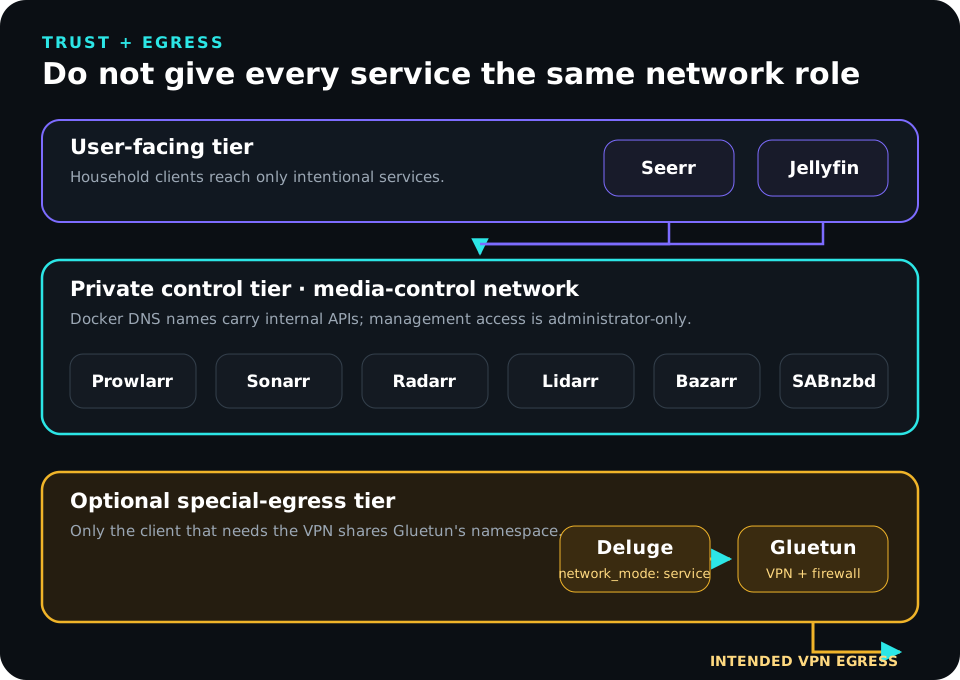
That means:
- Deluge does not get an independent application network;
- Deluge’s Web UI port is published by Gluetun;
- Sonarr/Radarr connect to Deluge through
http://gluetun:8112; - stopping Gluetun should remove Deluge’s external network path instead of allowing silent fallback.
This is a deliberate exception to the normal “use the service name” rule because Deluge is borrowing another service’s network namespace.
Management ports should not listen everywhere by default
The step-by-step guide uses a STACK_BIND_ADDRESS so administrative ports bind to a trusted LAN or management-VLAN address.
That is preferable to casually publishing:
0.0.0.0:8989
0.0.0.0:7878
0.0.0.0:9696
Binding to one address is still not a complete authorization policy. Router/VLAN rules, private-access tools, and Docker-aware host filtering may still be necessary.
Docker’s own Ubuntu documentation warns that published container ports can bypass normal UFW/firewalld expectations. Treat Docker port publishing as part of the network design rather than assuming a generic UFW deny rule makes a published port private.
Access tiers
The stack contains several different trust levels.
| Tier | Services | Intended audience |
|---|---|---|
| Playback | Jellyfin | Household users |
| Requests | Seerr | Approved request users |
| Automation control | Sonarr, Radarr, Lidarr, Bazarr, Prowlarr | Administrators |
| Download control | SABnzbd, Deluge, Gluetun | Administrators |
| Host control | SSH, Docker, filesystems | Trusted operators |
Do not expose every tier the same way.
A useful principle is that users should receive the narrowest interface that solves their job. Someone who requests a movie through Seerr does not need a Radarr API key. Someone who watches Jellyfin does not need Docker access.
The Compose project is an implementation of the contract
The architecture does not depend on one giant canonical Compose file.
The follow-along guide maintains the complete reference configuration. This article only needs the invariants the Compose project must preserve:
- LinuxServer services receive the
mediaUID/GID; - Sonarr, Radarr, Lidarr, SABnzbd, and Deluge mount
${DATA_ROOT}:/data; - Bazarr sees the same
/data/mediapath family reported by Sonarr and Radarr; - Seerr mounts only its appdata and runs with the official image’s UID expectations;
- management ports bind to the chosen trusted host address;
- ordinary automation services join
media-control; - Deluge uses
network_mode: service:gluetunwhen the VPN design is enabled; - no application receives the Docker socket;
- application containers do not run privileged;
- only the VPN boundary receives the capabilities it needs.
If you are ready to implement those choices, continue with the step-by-step build guide.
Dependency order
Architecture includes time. A valid end state can still be impossible to reach if the components are configured in the wrong order.
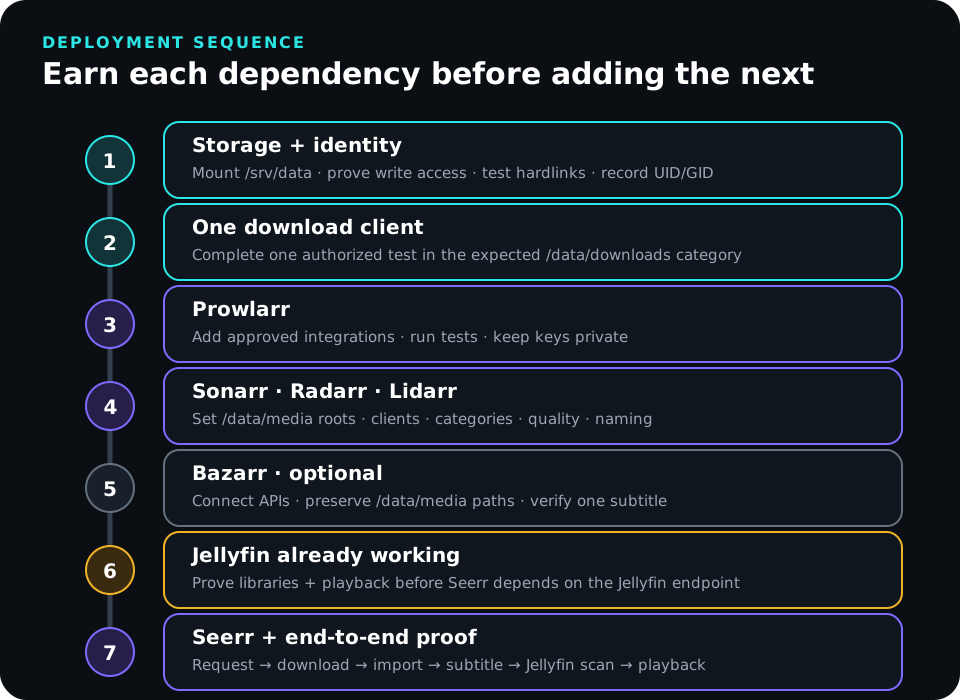
The reference dependency order is:
- Docker works.
/srv/datais the intended storage and the service identity can use it.- Required hardlink behavior is tested.
- The VPN provider values exist before Gluetun is started.
- Gluetun/Deluge is proven when that path is used.
- SABnzbd is configured if used.
- Prowlarr, Sonarr, Radarr, and optional Lidarr can reach one another.
- Bazarr sees the same media paths reported by Sonarr/Radarr.
- Jellyfin is already deployed and playback is proven.
- Seerr is configured against the working Jellyfin, Radarr, and Sonarr endpoints.
- One complete request-to-playback workflow succeeds.
- Backup and restore are tested.
The earlier version of the documentation placed Seerr before Jellyfin was actually established. That is a dependency error, not merely a writing preference.
Application path and endpoint reference
The most common integration mistakes are wrong paths and wrong hostnames.
Library paths
| Application | Root/library path |
|---|---|
| Sonarr | /data/media/shows |
| Radarr | /data/media/movies |
| Lidarr | /data/media/music |
| Bazarr | /data/media/... matching Sonarr/Radarr |
| Jellyfin | /media/shows, /media/movies, /media/music |
Internal automation endpoints
| Caller | Dependency | Reference endpoint |
|---|---|---|
| Prowlarr | Sonarr | http://sonarr:8989 |
| Prowlarr | Radarr | http://radarr:7878 |
| Prowlarr | Lidarr | http://lidarr:8686 |
| Sonarr/Radarr/Lidarr | SABnzbd | http://sabnzbd:8080 |
| Sonarr/Radarr/Lidarr | Deluge behind Gluetun | http://gluetun:8112 |
| Bazarr | Sonarr | http://sonarr:8989 |
| Bazarr | Radarr | http://radarr:7878 |
| Seerr | Radarr | http://radarr:7878 |
| Seerr | Sonarr | http://sonarr:8989 |
| Seerr | Jellyfin | trusted host/LAN URL by default |
Categories and labels
| Media type | SABnzbd category | Deluge label |
|---|---|---|
| Shows | shows | shows |
| Movies | movies | movies |
| Music | music | music |
Categories are part of the control contract. They tell the automation application which completed jobs belong to it.
Remote path mappings are exceptions
A remote path mapping is useful when two systems genuinely report different filesystem paths, such as a downloader running on another host.
It is not a repair tool for a single-host Docker layout that already maps /srv/data to /data everywhere.
If SABnzbd reports:
/data/downloads/usenet/complete/moviesand Radarr can see:
/data/downloads/usenet/complete/moviesthere is nothing to translate.
Adding a mapping to a correct design creates a second representation of the path and another place to make a mistake.
Security boundaries
The automation applications contain API keys, downloader credentials, search-service credentials, filesystem paths, and the authority to move or delete files.
Treat them as control-plane applications.
Protect secrets
Keep real .env values, API keys, VPN credentials, private endpoints, and provider details out of Git and public screenshots.
Before publishing logs or examples, sanitize:
- API keys and tokens;
- VPN keys and assigned ports;
- private search-service or tracker identities;
- hostnames and private topology details;
- request history and usernames;
- filesystem paths that disclose personal identifiers.
Keep privileges narrow
Do not mount /var/run/docker.sock into the media stack merely for convenience.
Do not run Sonarr, Radarr, Prowlarr, Bazarr, SABnzbd, Seerr, or Deluge as privileged containers.
Gluetun is intentionally different because network control is its job. That exception should be visible and reviewable.
User-facing does not mean public-by-default
Seerr and Jellyfin are user-facing, but that does not automatically mean they belong on the public internet.
Remote access can be implemented through a private overlay, a deliberately configured reverse proxy, or another access model. The correct choice depends on the clients and threat model.
Back up the control plane
The stack’s appdata is much smaller than the media library but usually much harder to reconstruct from memory.
Protect:
/srv/compose/arr-stack/compose.yaml;- a sanitized
.env.example; - the real secret material in an appropriate private store or backup;
/srv/appdata/arr-stack/sonarr;/srv/appdata/arr-stack/radarr;/srv/appdata/arr-stack/lidarrif used;/srv/appdata/arr-stack/prowlarr;/srv/appdata/arr-stack/bazarrif used;/srv/appdata/arr-stack/sabnzbdand/srv/appdata/arr-stack/delugeif used;/srv/appdata/arr-stack/seerr;- Gluetun state that cannot be recreated;
- the image tags or digests that match the backup.
For SQLite-backed applications, a stopped-container copy or the application’s supported backup mechanism gives a clearer consistency boundary than copying live databases and hoping.
Recovery is a workflow test
A useful isolated restore proves more than “the files extracted.”
It should verify that:
- appdata restores with the correct ownership;
- Compose resolves;
- service-name connections work;
- root folders point at the intended test
/datatree; - Prowlarr can synchronize to test Sonarr/Radarr instances;
- one authorized test item completes and imports;
- Seerr can submit a request;
- Jellyfin sees and plays the resulting file.
A backup you have never restored is a theory.
Update by dependency, not by calendar
Stable image tags are channels, not immutable artifacts.
Before a change:
- read upstream release notes;
- confirm the latest configuration backup;
- record the current image digest;
- check available disk space;
- choose a representative validation workflow;
- define the rollback point.
Update one functional layer at a time:
- downloader;
- Prowlarr;
- Sonarr/Radarr/Lidarr;
- Bazarr;
- Seerr.
After each layer, test its dependencies before moving on.
Database migrations deserve special care. Rolling an image tag backward does not necessarily roll a database backward. A safe rollback may require both the previous image and the matching pre-update appdata snapshot.
Monitor the workflow, not only container state
Nine green containers do not prove that a request becomes a playable file.
Monitor:
- free space and inodes under
/srv/appdataand/srv/data; - presence of the intended
/srv/datamount; - application health warnings;
- Prowlarr integration failures;
- stalled downloader jobs;
- imports waiting for intervention;
- permission errors;
- unexpected copy behavior or duplicate storage growth;
- Seerr request failures;
- Jellyfin library freshness;
- backup completion and restore-test age;
- Gluetun health and expected egress when used.
A periodic canary workflow is more valuable than another dashboard widget:
- submit or add a small authorized item;
- confirm the automation policy;
- confirm the downloader category;
- observe completion;
- confirm import and naming;
- verify hardlink behavior when expected;
- verify subtitle handling if enabled;
- confirm Jellyfin scans and plays it;
- remove the test according to policy.
Troubleshoot by boundary
The architecture suggests the troubleshooting order.
| Symptom | Boundary to inspect first |
|---|---|
| Prowlarr cannot connect to Sonarr/Radarr | Docker network, service name, API key |
| Download completes but will not import | Reported path, /data visibility, category, UID/GID |
| Import copies instead of hardlinking | Filesystem device, mount layout, permissions |
| Bazarr API works but files are missing | Filesystem path agreement |
| Seerr logs into Jellyfin but requests fail | Radarr/Sonarr endpoint, API key, root folder, profile |
| Deluge disappears when Gluetun fails | Expected VPN namespace behavior; inspect Gluetun |
| Root disk suddenly fills | Verify the exact /srv/data mount before anything else |
| Containers are healthy but requests fail | Walk the request-to-playback chain one boundary at a time |
A path problem should be demonstrated at both sides
If a downloader reports:
/data/downloads/usenet/completeenter the importing container and inspect that same path.
If the names match but the data does not, the problem is storage or permissions—not a remote path mapping.
A permission problem should be tested as the service identity
Do not diagnose with root and conclude the application has access.
Test the required operation as media on the host, then test from inside the relevant container.
A network problem should follow the real path
A successful browser connection to Radarr from your laptop does not prove Prowlarr can resolve radarr on the Docker network.
A successful Seerr login to Jellyfin does not prove Seerr can reach Radarr.
A successful Deluge Web UI does not prove its external traffic uses the intended VPN path.
Each test proves only the path it actually exercised.
When to deviate from the reference design
The reference is deliberately boring. Deviate when a real requirement justifies it.
Separate service identities
Use separate application users with a shared media group when stronger local isolation matters more than configuration simplicity.
Document:
- which UID/GID each container uses;
- which group grants shared write access;
- the directory ownership model;
- the umask;
- how remote storage maps those numeric identities.
Multiple Docker hosts
If downloaders and automation applications live on different hosts, Docker service names and one local /data bind no longer solve the whole path problem.
You may need:
- shared storage mounted at matching paths on both hosts;
- real network DNS names;
- remote path mappings when a downloader reports a genuinely different path;
- more explicit firewall policy;
- independent failure handling when one host disappears.
No VPN-routed downloader
If Deluge does not require Gluetun, put it directly on media-control, publish/bind its administration port deliberately, and use http://deluge:8112 internally.
Removing an unnecessary component is an architectural improvement.
No Seerr
If only administrators add media directly in Sonarr/Radarr, omit Seerr and its database, user model, and public/request access path.
The best stack is the smallest stack that performs the required jobs.
Reference validation checklist
Storage
-
/srv/datais the intended filesystem or exact mounted dependency. - Downloaders and importers see it as one
/dataroot. - Hardlinks are proven where the workflow expects them.
- Jellyfin receives only
/srv/data/mediaas/media:ro. - Appdata remains separate from bulk media.
Identity
- The existing
mediaUID/GID is known. - LinuxServer containers use that identity deliberately.
- The required host operations succeed as
media. - Seerr’s config is writable by UID 1000.
- Remote storage maps numeric identities intentionally.
Networking
- Automation services share
media-control. - Internal API calls use Docker service names.
- Seerr reaches the already-working Jellyfin endpoint.
- Deluge uses Gluetun’s namespace only when required.
- Management ports are reachable only from intended networks.
- Docker/UFW behavior is accounted for rather than assumed.
Workflow
- Downloader categories/labels match the automation application.
- Sonarr uses
/data/media/shows. - Radarr uses
/data/media/movies. - Lidarr uses
/data/media/musicwhen used. - Bazarr sees the same
/data/media/...paths. - Seerr can submit a test request when used.
- Jellyfin plays the final organized file.
Recovery
- Appdata leaves the Docker host in backups.
- Secrets are excluded from public/versioned files.
- Image tags or digests are recorded with backups.
- A restore has been tested in isolation.
- The update process includes a database-aware rollback boundary.
Build it from here
If the reference model above matches what you want, the next article is the literal implementation:
Build Your *arr Stack: A Step-by-Step Docker Media Automation Guide →
That walkthrough installs Docker correctly, proves the storage mount and hardlink behavior, prepares the media and Seerr identities, collects Gluetun provider values, writes the complete Compose project, starts services in dependency order, configures each application, validates the request-to-playback workflow, and performs a backup/restore drill.
This reference article exists so those steps have an architecture behind them instead of looking like arbitrary commands.
References and further reading
- Build Your *arr Stack: A Step-by-Step Docker Media Automation Guide
- The Definitive Guide to Jellyfin on Ubuntu with Docker
- Docker Engine installation on Ubuntu
- Docker packet filtering and firewalls
- Docker Compose file reference
- Servarr Docker guide
- TRaSH Guides — Docker folder structure
- TRaSH Guides — Hardlinks and Instant Moves
- LinuxServer Sonarr image
- LinuxServer Radarr image
- LinuxServer Lidarr image
- LinuxServer Prowlarr image
- LinuxServer SABnzbd image
- LinuxServer Deluge image
- Bazarr setup guide
- Seerr Docker installation
- Seerr migration guide
- Gluetun documentation
AI transparency
AI assisted with research, technical cross-checking, structure, editing, and sanitized reference examples. The architecture is grounded in the Docker-based Jellyfin and media-automation environment I actually operate and in the implementation documented by the companion step-by-step guide. The September 13, 2026 revision explicitly separates this page’s role as an architecture/reference guide from the follow-along deployment guide and aligns both articles to the same storage, identity, and networking contracts.